A terminal where every tab is its own Linux
I run multiple coding agents at the same time. Not because it’s efficient — because I’m impatient. One is writing a migration, another is refactoring a module, a third is poking at a bug. The dream is parallelism: three things moving forward at once.
The reality was messier. Two agents in the same repo step on each other constantly. One runs a Hasura metadata change and wipes what the other was doing. One stages files, the other rebases. So you learn to think sequentially anyway — let this one finish, save its work, then start the next. The parallelism was pretend.
So I started isolating them. Not with git worktrees, not with Docker containers — with full Linux VMs, one per agent, running on macOS through OrbStack.
I call it orbterm. Half the name is obvious — it’s a terminal built on OrbStack. The other half arrived while I was writing this: the Amp team shipped agents in orbs — remote machines, one per agent, spun up as casually as a browser tab. Same instinct, different substrate: their orbs live in the cloud, mine boot on my laptop. When the people building a frontier coding agent land on “give every agent its own machine”, it stops feeling like a personal eccentricity.
one migration wipes another's work
nothing to collide over
Why not worktrees
Worktrees isolate the code. But a project is more than code — let’s not lie to each other. It’s your Postgres with two years of local data. It’s Redis with a warm cache. It’s Temporal, Hasura, the worker that keeps crashing on startup. You don’t want one agent’s migration touching another agent’s database. Worktrees share all of that. The isolation is a thin layer over the part that actually matters.
Why not Docker
Funny thing: I do use Docker — inside each VM. The whole dev stack is baked into the image. So Docker isn’t the enemy. The problem is memory.
If a container spikes to 6GB during an eslint run and then settles, those 6GB stay allocated — forever, until you restart it. On a laptop that adds up fast. And here’s what I learned the hard way after a deep dive into the alternatives: almost nobody gives memory back. Once a VM or container grabs RAM, the host never sees it again — not even Apple’s own container runtime. OrbStack is the rare one that releases memory back to macOS when the work is done. That single property is the reason the whole thing sits on OrbStack.
What it looks like
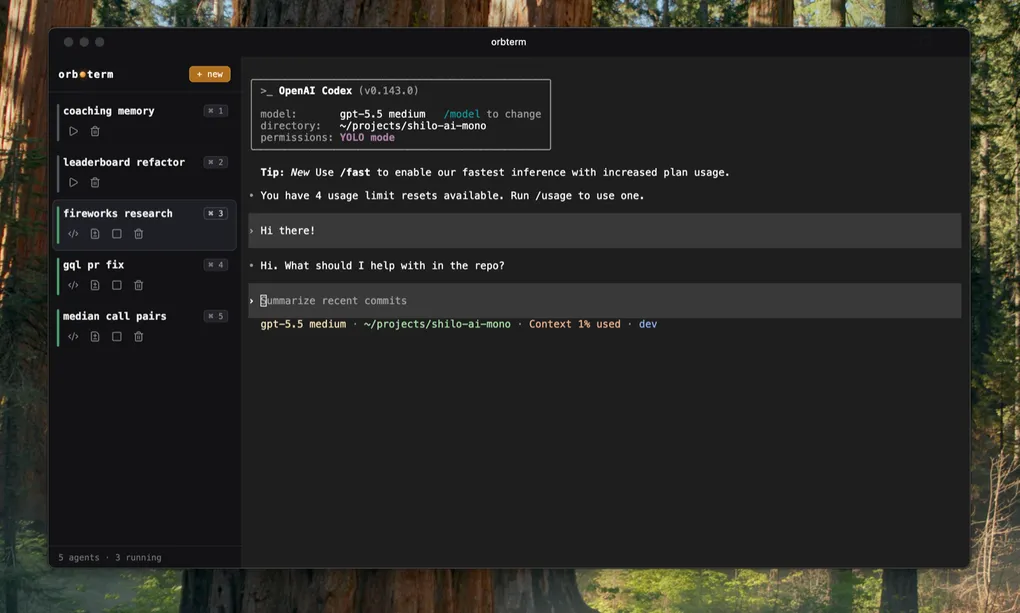
A plain, almost boring terminal. You open a new tab, it takes three seconds. That’s the anti-feature — a slow terminal, on purpose. Because every new tab isn’t a tab. It’s its own Linux, with its own filesystem, its own Postgres, its own copy of the repo. Three seconds is the cost of booting a world.
It didn’t stay a bare terminal, though. It grew a small control plane. Each row on the left is an agent living in its own VM. Hit + new and a fresh world boots. ⌘1–⌘5 to jump between them. A diff viewer built right in — I put it together on top of Pierre’s React diff primitives, so I can review what an agent changed without opening VS Code at all. When I do need the full editor, one click opens the VM over VS Code SSH.
Under the hood it’s deliberately small: an Effect TS server that wraps orbctl, owns persistent Codex PTY sessions — so a websocket reconnect replays the buffer instead of killing the agent — and serves a React UI on xterm.js. There’s no database. The state is whatever orbctl and the VMs say it is, derived live. If the server dies, nothing is lost; the worlds keep running without it.
I installed it as a PWA, so it lives on the machine like a real app — with shortcuts. Now ⌘⌃K summons it from any screen, and Raycast can pull it up too. It went from “a thing I run” to “a thing that’s just there.”
From the outside it looks unremarkable. From the inside, each tab is a micro-universe two agents will never collide in.
Getting there was a series of wrong turns
I didn’t design this. I argued my way into it.
First instinct: share everything on the host — one Postgres, one Temporal, save the RAM. Then I realized the sharing buys almost nothing and costs me all the isolation I came for. So I flipped: a separate Postgres per agent. Sixty megabytes of RAM to make an entire class of problems disappear — that’s free, take it. Eventually I stopped half-sharing and just baked the whole thing — Postgres, Redis, Hasura, Temporal, Docker — into one VM image. Kill the VM, the whole world dies with it. One lifecycle to reason about instead of a zoo.
The reason this isn’t insane on disk is copy-on-write. OrbStack clones a VM from a base image without copying the bytes — every clone just points at the same base layer and only pays for what it actually changes. The base is around 10GB: all the Docker images, Postgres with two years of data, the repo. Yet ten clones don’t cost 100GB — they share that one base and diverge by a few diffs each. Cloning a whole world becomes nearly free, in both time and space.
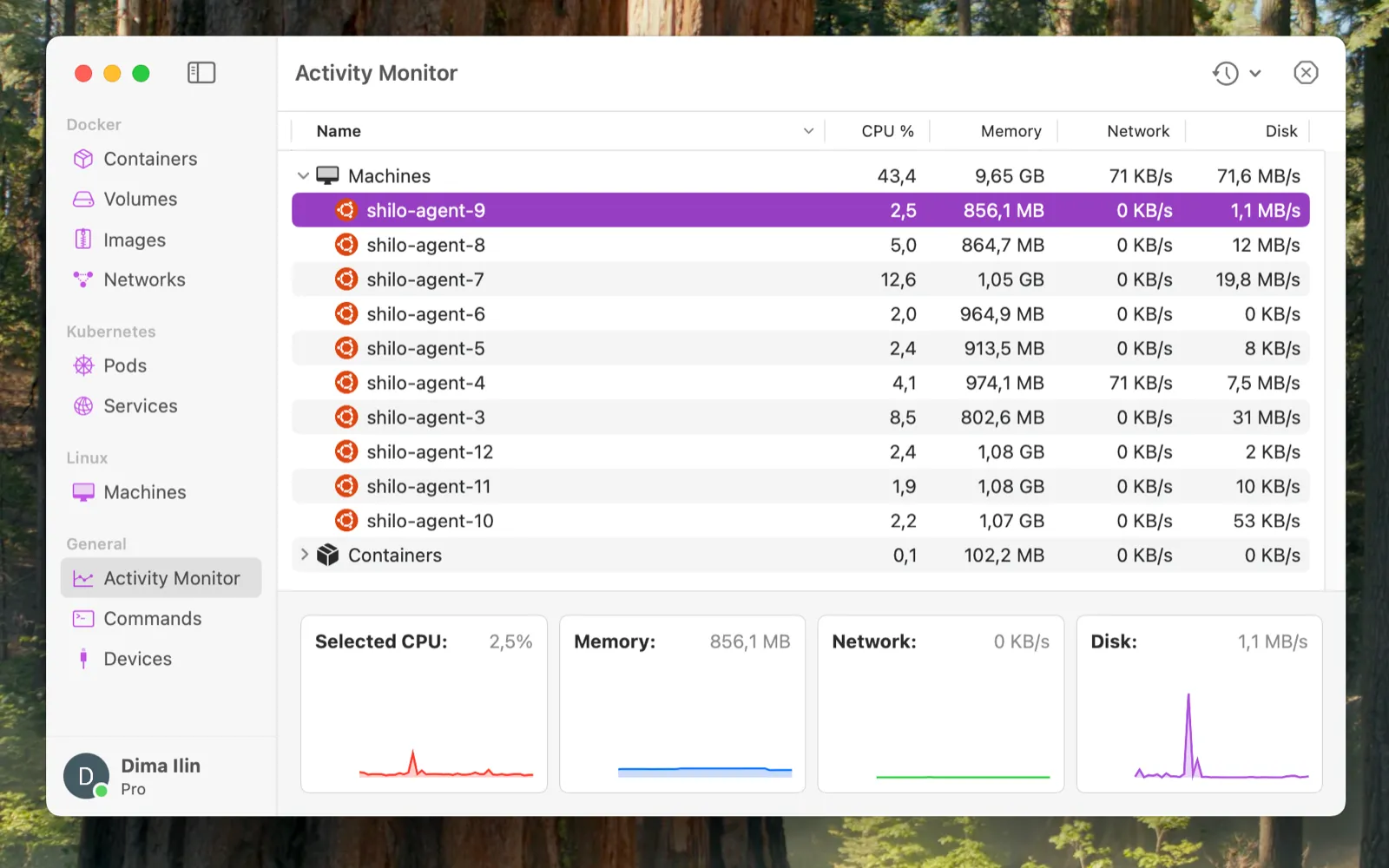
The payoff that surprised me: I ran ten VMs at once on a 24GB MacBook, each with a full dev environment and a coding agent inside. They ate about 9–10GB and the machine stayed usable. Ten parallel worlds, no cloud, on a laptop. I’ll call that a success.
The scare that turned out to be nothing
The worst day was the token war. To save myself from logging in inside every VM, I mounted ~/.codex from macOS straight into each one — so every agent read and wrote the same credentials file. Convenient, until several agents in different VMs all noticed the access token was about to expire, all grabbed the refresh token at once — no locks, they don’t know about each other — and broke authentication for everyone, including my local terminal. One shared file, a dozen writers. Everything died at the same time.
I spent two days designing a clever daemon to refresh the token early, before any agent would touch it. Then I actually measured it: the token only rotates every ten days or so. There was nothing to babysit. The scariest problem on the board quietly deleted itself. A lot of this project has been like that — panic, then it turns out simple.
The flow I’m starting to feel
For a while I wrote that there was a new kind of flow here I couldn’t feel yet — a way of working that didn’t exist before, so I had no muscle memory for it. My old flow was stubbornly sequential: cd in, warm up the environment, start the agent, plan, branch, implement, review, babysit the PR. One thing at a time.
It’s starting to click now. I spawn an agent for the migration, another for the refactor, a third to chase the bug — and they genuinely don’t know about each other. They can’t. They live in different machines. When one finishes, I merge its world back. I’ve caught myself actually enjoying it: when I see an agent doing something ugly or slow, I peel off a fresh one to go look at exactly that, then fly off into the sidequest. I even let agents spawn their own agents — a late-night idea I couldn’t sleep on. I still don’t know how often I’ll use it, but the shape of it feels right.
The friction isn’t technical anymore. The last bit of it is in my head, still defaulting to serial thinking because that’s all I’ve ever known.
Where this goes
Honestly? Nowhere grand. I shared it with a few colleagues — Austin, Taras, and Misha all gave it a real go. It’s not for everyone, and that’s fair: it takes some practice to flip your perception and break the old habits. OrbStack can even export a whole machine as an archive you hand to someone else. I poked at a cloud version on Hetzner so people could skip the local setup. Interesting, but not where my energy is.
I’m not trying to build a product. It became my daily tool, and somewhere along the way it got genuinely fun. That’s enough. Every tab is its own Linux, and I’m learning to think in tabs. If you want to poke at it, the code is at github.com/Dimirolz/orbterm.
And the real credit goes to the OrbStack team. They’re the ones pulling off the miracle — VMs that boot in a heartbeat and actually give memory back. I just wrote a little frontend around it. The Pro license is worth every cent for the sheer amount of engineering they’ve poured into this thing.